
Maxinst Operations Viewer · Add-on for IBM Maximo
See your plant. Not just data.
Maxinst Operations Viewer adds a real-time visual layer on top of your IBM Maximo. Faster decisions, with spatial context, without giving up the Maximo your operation already trusts.
20+
years in critical assets
100+
projects delivered
IBM Silver
official partner
The problem
Your operation generates data all the time. Your team can't read all of it in time.
Work orders, work permits, change orders and elevated-risk tasks pile up in tables and separate screens inside Maximo. Multiplied by your operation's daily volume, that's qualified time an asset that can't stop doesn't have to spare.
The problem isn't a lack of data. It's not seeing the right data, in the right place, at the right time.
90s
is the average time it takes today to locate and understand the status of a single work order.
How it works
The same information from Maximo, now over your plant's layout
01
Configure
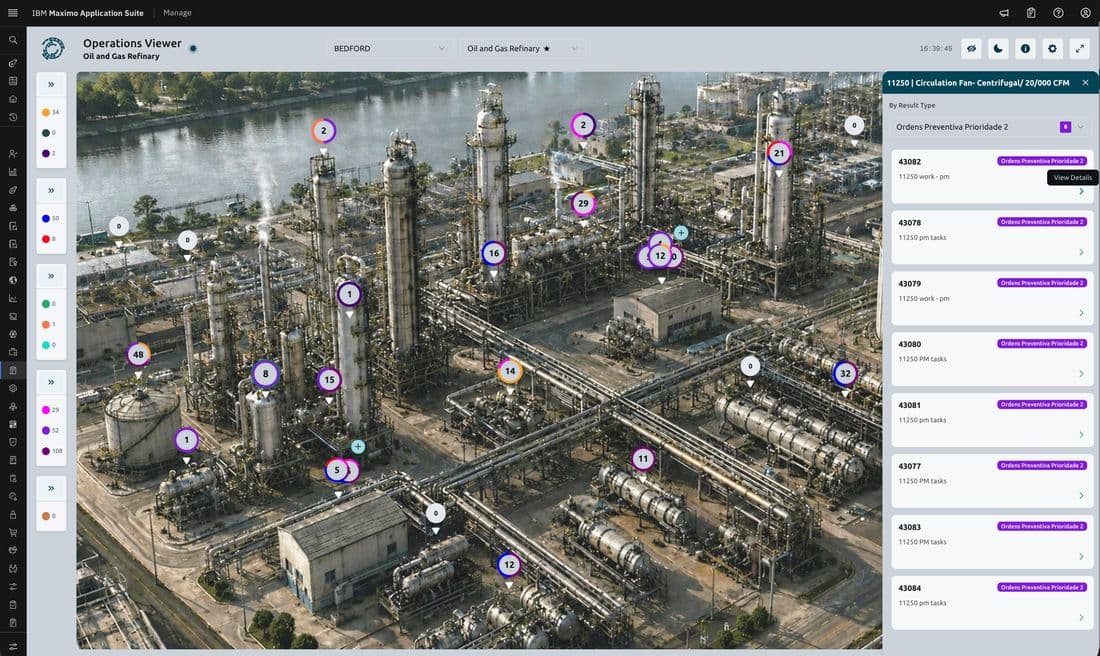
An administrator positions operational points over the image of your plant or asset. A visual map built on top of the data that already exists in Maximo, without duplicating anything.
02
Visualize
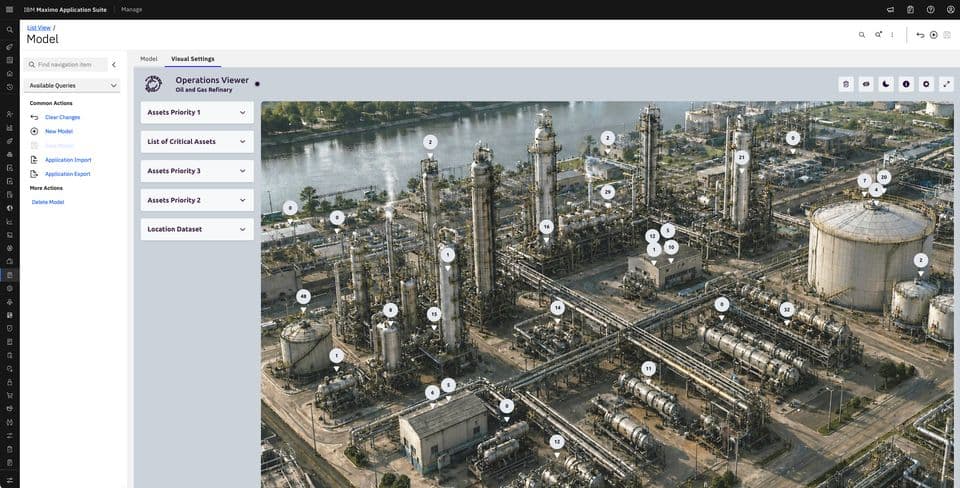
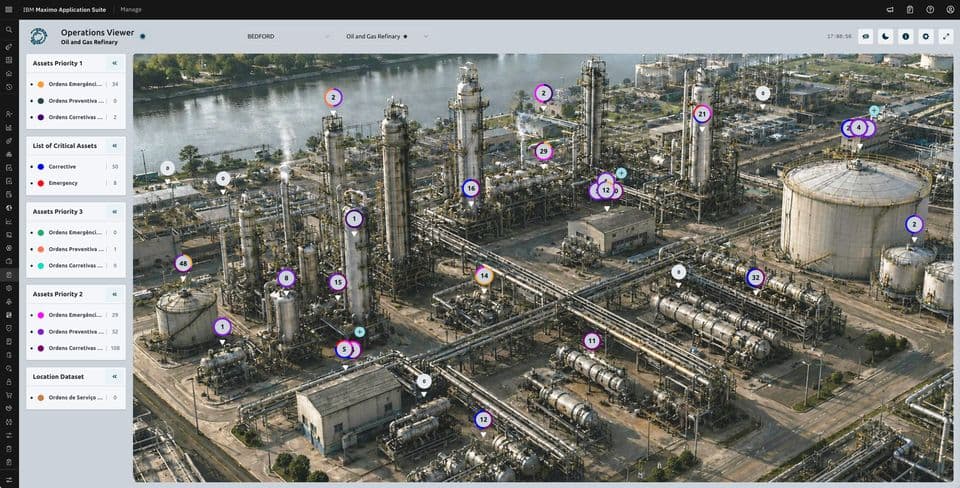
Each point on the map shows, in real time, the records in progress at that position, automatically updated at the interval you configure.
03
Decide
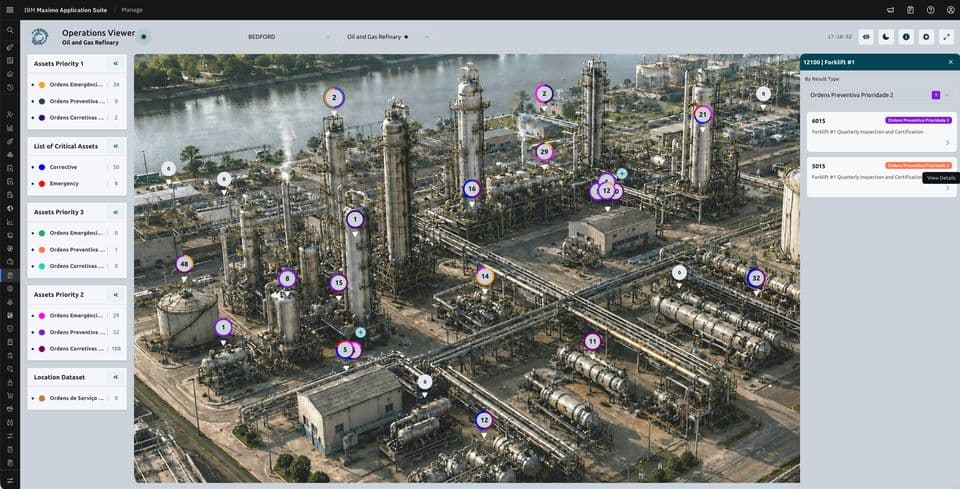
Click any point to open the list of records for that location and understand, in seconds, what's happening there.
04
Go straight to the record in Maximo
Do everything you need directly on the Maximo record. All the permissions the user already has will be enabled, respecting every data and function access setting on the record screen.
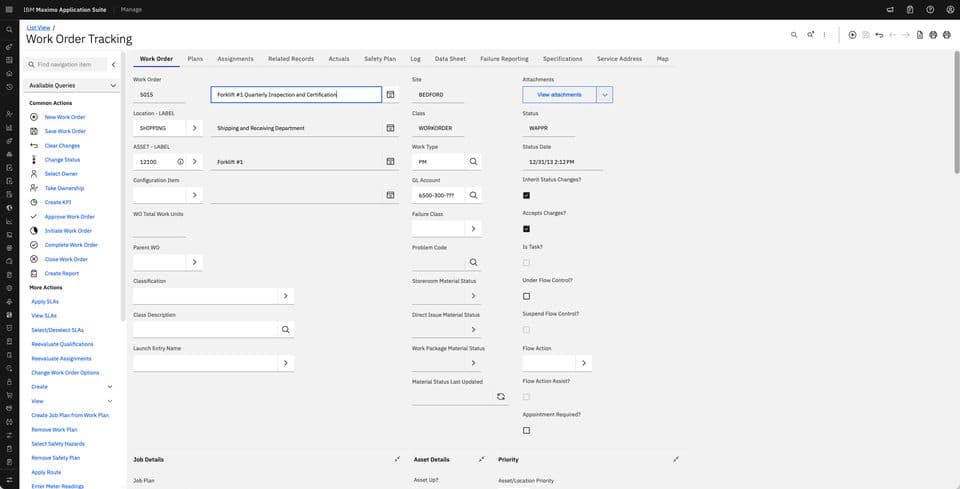
MOV doesn't replace Maximo. It speeds up the path to it.
Differentiators
Continuity, control and scale on top of the Maximo you already have
Operational continuity
See concentrations of activity at the same point on the map and decide with full spatial context, before an operational conflict stops production.
Built on top of Maximo
Modern interface embedded right inside Maximo. Zero data duplication, 100% compatibility with the environment you already have.
Native security
MOVADMIN and MOVUSER use the same Maximo Security Groups module. There's no parallel permission system.
Fast rollout
In a few hours, the add-on can already be active, generating visibility over real data from your operation.
Proof of value
The time saved analyzing work orders alone pays for the investment
In a reference scenario with 3 sites in operation and 40 work orders per day per site, reducing the average work order analysis time from 90 to 12 seconds returns about 78 hours of qualified work per month to your operation.
90s → 12s
average work order analysis time, today vs. with MOV
~78 h/month
of qualified work returned to the operation
~55% per year
of projected return on investment
~7.7 months
of estimated payback
Reference figures calculated with real work order volume parameters. Your operation may have a different volume: talk to us and we'll simulate your scenario.
Who it's for
Built for people who decide under pressure
Technical prerequisites
IBM Maximo Asset Management 7.6+ or Maximo Application Suite 8.x+ or 9.x+. Plant or asset image available via public URL or an attached document in the system.
Test it with real data from your operation. No cost, no commitment.
You can try Maxinst Operations Viewer for 30 days, on one site of your operation, with full access to its features, before deciding on a subscription. During the period, our team supports the installation, initial configuration and offers full technical support. At the end of the 30 days, you decide whether to continue, with no prior commitment.
Exclusive to subscribers
A community of people who use the product every day
By subscribing, you join the Maxinst Operations Viewer community, alongside paying IBM Maximo users worldwide. There, the roadmap evolves democratically, shaped by the real needs of people who already use the product.

During the trial, our team stays in touch through a cadence flow, helping you get the most value out of the product before the subscription decision.
Continuity isn't luck. It's orchestration.
Maxinst has been a critical-asset consultancy for over 20 years, with more than 100 projects delivered in environments where stopping isn't an option. IBM Silver partner, specialized in EAM, APM and computer vision. Maxinst Operations Viewer was born from that same practice: orchestrating technology so the operation keeps running.

What you need to know before trying it
Do I need IBM Maximo to use Maxinst Operations Viewer?
For now, yes. But Maxinst Operations Viewer can be adapted for other systems. Talk to our specialists to find out how.
How long does it take to install in my environment?
In a few hours, the add-on can already be active and generating insights in your system.
Is there a trial available?
Yes. You can try Maxinst Operations Viewer for 30 days, at no cost, on one site of your operation, with full access to its features, before deciding on a subscription. It's enough time to validate the value proposition with real data from your environment, not an isolated demo.
How does the 30-day trial work?
The trial is activated on a single site of your choice. During the period, our team supports the installation, initial configuration and offers full technical support. At the end of the 30 days, you decide whether to move forward with the subscription, with no prior commitment.
Is there a community or group for product users?
The Maxinst Operations Viewer community is exclusive to subscribing clients. While you're in the trial period, our team stays in touch through a cadence flow, helping you get the most value out of the product before the subscription decision. Once you subscribe, you join the community, alongside IBM Maximo users worldwide. There, the roadmap evolves democratically, shaped by the real needs of people who use the product every day.
Can I test the installation first in a development and/or staging environment?
Yes. Our licensing model includes a "non-production" license for this. This technical test in staging is independent of the 30-day commercial trial, which takes place in the real production environment, with real operational data.
How do I get support for installing the product?
Once your usage license is released, you'll receive, along with the software package, an installation manual and a user guide for the product. If you have any questions, you can contact our support through the channels listed in the manual and user guide.
How does the rollout work? Do I need to pay any additional fee?
The rollout is carried out by the system administrator with full support from our product team. There are no additional costs. The subscription fee covers all costs of rollout, support, use and evolution of the product.

Start your 30-day trial
Tell us a bit about your operation. Our team confirms whether your environment is ready and releases access.